Ontwikkelomgeving Techday 2WD Car

Zelf verder sleutelen aan de code? Lees hier hoe je met Visual Studio, PlatformIO en Blynk kunt zelf kunt ontwikkelen.
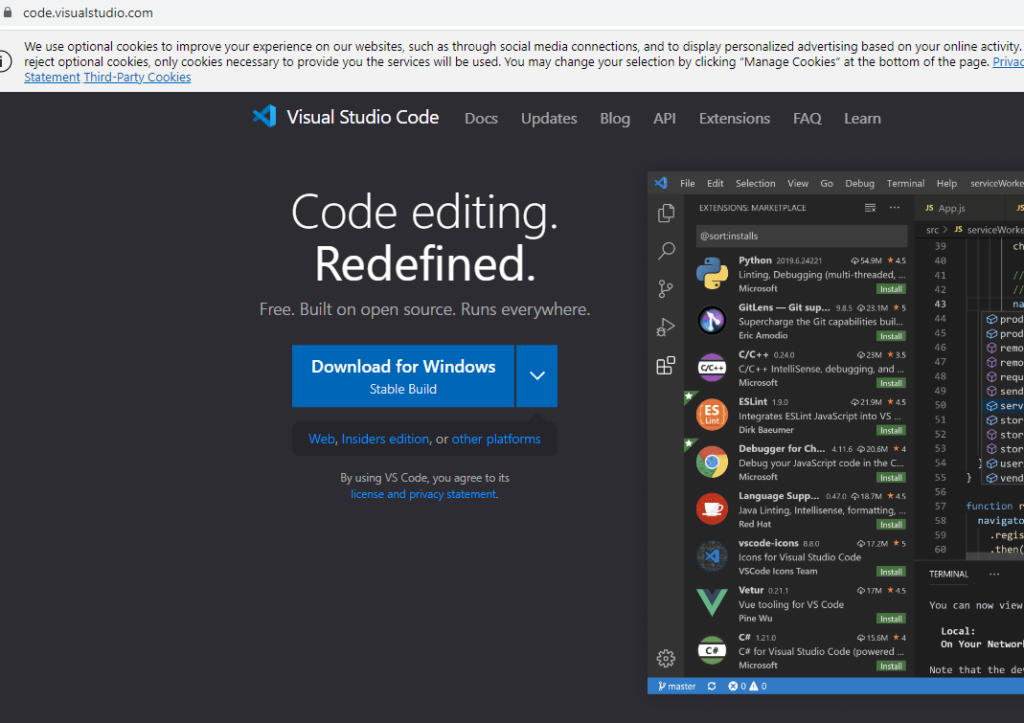
Ga naar https://code.visualstudio.com/ en download de stable build voor jouw operating system. Hieronder beschrijf ik alleen Windows. Voor de Mac en Linux zijn online goede instructies te vinden.
Klik op de installatiewizard om de installatie te starten en volg alle stappen om de installatie te voltooien.

Installatie van Python in Windows

Om de ESP8266 met PlatformIO IDE te programmeren, moet Python 3.5 of hoger op je computer zijn geïnstalleerd.

Ga naar https://python.org/downloads en download de nieuwste versie.

Open het gedownloade bestand om de installatiewizard van Python te starten.

Zorg dat Python in PATH wordt opgenomen (optie tijdens installatie).

Installatie PlatformIO IDE Extension in VS Code

Met behulp van VS Code met de PlatformIO IDE-extensie kan de ESP8288 geprogrammeerd worden. Volg de volgende stappen om de PlatformIO IDE-extensie te installeren.

VS-code openen:

  • Klik op het pictogram Extensies of druk op Ctrl+Shift+X om het tabblad Extensies te openen
  • Zoek naar “PlatformIO IDE”
  • Selecteer de eerste optie
  • Klik ten slotte op de knop Installeren (Let op: de installatie kan enkele minuten duren)

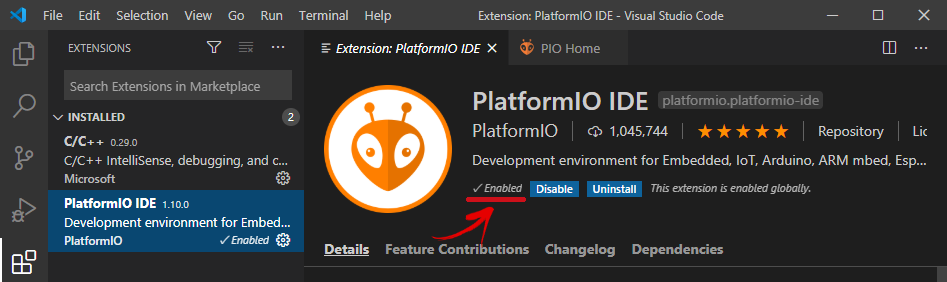
Zorg ervoor dat de Platform IDE Extensie is enabled:
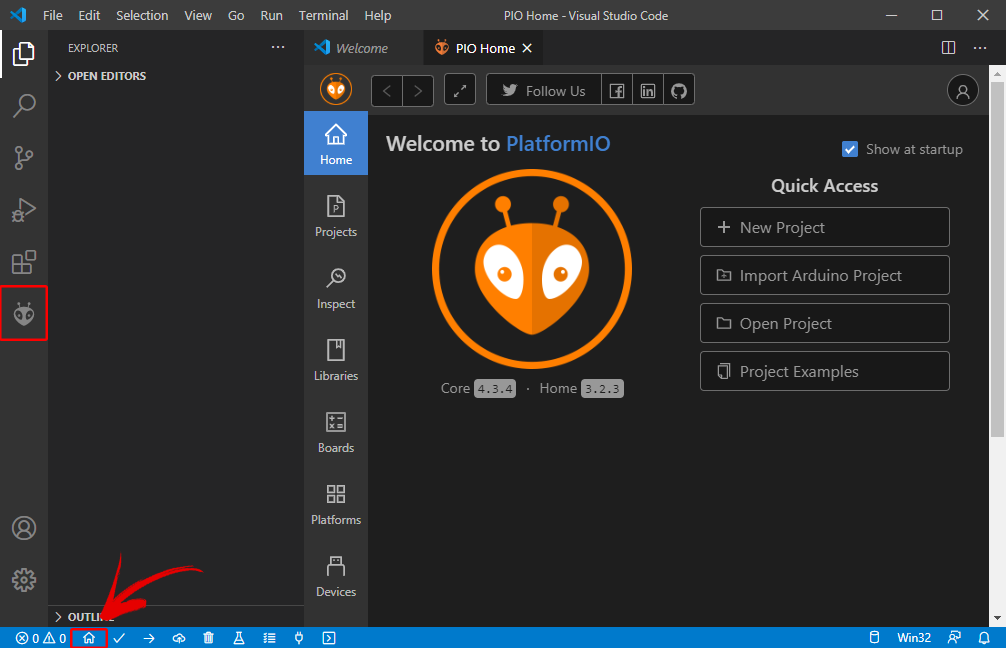
Daarna zou het PlatformIO-pictogram in de linkerzijbalk moeten verschijnen evenals een Home-verwijzing naar de PlatformIO site.
Belangrijke commando’s

  • File Explorer Ctrl+Shift+E
  • Zoeken in files Ctrl+Shift+F
  • Source Code Control Ctrl+Shift+G
  • Launch and debug Ctrl-Shift+D
  • Manage Extensions Ctrl+Shift+X
  • Alle commando’s Ctrl+Shift+P

Onderin vind je een blauwe balk met PlatformIO commando’s.

De iconen van links naar rechts:

  • PlatformIO Home
  • Build/Compile
  • Upload
  • Clean
  • Serial Monitor
  • New Terminal

Via onderstaande link kun je de sourcecode downloaden. Pak deze uit op een plek naar voorkeur. Dit resulteert in een directory Techday23.

Sourcecode (RDW)

Sourcecode (Greater)

Via PIO Home kun je de directory openen (Open Project). Het duurt even voordat PlatformIO (afgekort PIO) alle benodigde libraries heeft gedownload.
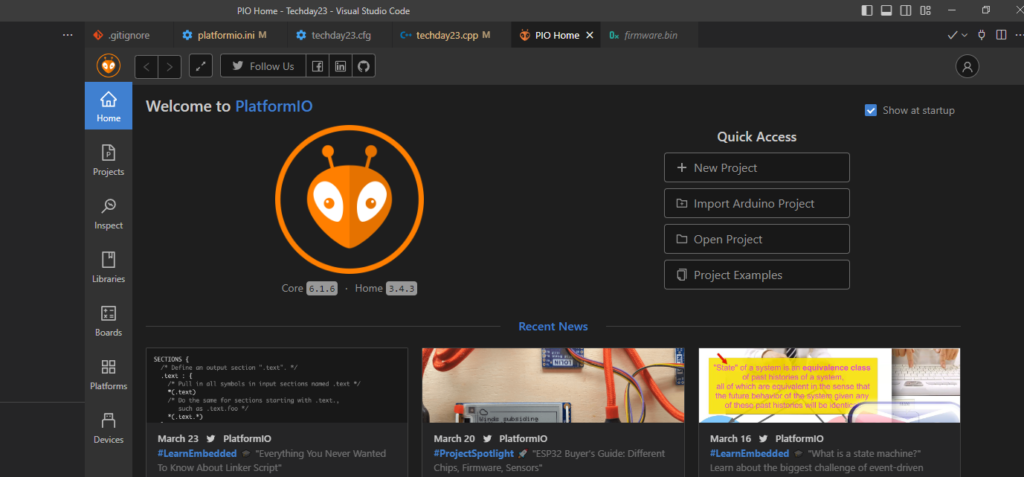
Je kunt nu de sourcecode compileren en naar de ESP8288 uploaden. Voor dit laatste heb je een Micro USB kabel nodig.


Posted

in

by

Tags:

Comments

11 responses to “Ontwikkelomgeving Techday 2WD Car”

  1. Rein-Jan Veenstra Avatar
    Rein-Jan Veenstra

    Hoe kan ik thuis met de app hetzelfde doen als op de Techday? Verbinding maken lukt nu niet. Iets met WiFi begreep ik?

  2. https://iloveroom.co.il/room/דירות-דיסקרטיות-בחיפה/ Avatar

    Right here is the right blog for anyone who would like to understand this topic. You realize so much its almost hard to argue with you (not that I actually will need toÖHaHa). You certainly put a brand new spin on a subject thats been discussed for years. Wonderful stuff, just great!

  3. israelnightclub.com Avatar

    Itís nearly impossible to find educated people in this particular subject, however, you seem like you know what youíre talking about! Thanks

  4. https://stevieraexxx.rocks/city/Discreet-apartments-in-Givatayim.php Avatar

    Excellent write-up. I certainly appreciate this website. Keep it up!

  5. https://loveroom.co.il/room/דירות-דיסקרטיות-בבאר-שבע/ Avatar

    Itís hard to find well-informed people on this topic, however, you seem like you know what youíre talking about! Thanks

  6. wwd.com Avatar

    Hey there! Someone in my Myspace group shared this site
    with us so I came to look it over. I’m definitely enjoying the information. I’m bookmarking and will be tweeting this to my followers!
    Great blog and brilliant design and style.

  7. best gold ira companies Avatar

    Hey just wanted to give you a quick heads up and let you know a few of the pictures aren’t loading correctly.
    I’m not sure why but I think its a linking issue.
    I’ve tried it in two different internet browsers and both show the same outcome.

  8. person with most followers on tiktok Avatar

    Hi! I’m at work surfing around your blog from my new
    iphone 4! Just wanted to say I love reading your blog and look forward to all your posts!

    Carry on the fantastic work!

  9. instagram not showing new followers Avatar

    I always spent my half an hour to read this web site’s content everyday along with a mug of coffee.

  10. More information Avatar

    I relish, lead to I found exactly what I used to
    be having a look for. You’ve ended my 4 day lengthy hunt!
    God Bless you man. Have a nice day. Bye

  11. astrohvarna. Avatar

    Such an informative and well-written article! I appreciate how this site
    shares such helpful insights.

Leave a Reply to More information Cancel reply

Your email address will not be published. Required fields are marked *